
AcroForm vs. flat or scanned PDF.
Two documents can look identical while behaving completely differently. An AcroForm contains named fields. A flat PDF contains page content without input controls. A scan may be only an image. That distinction decides what a filling workflow has to do next.
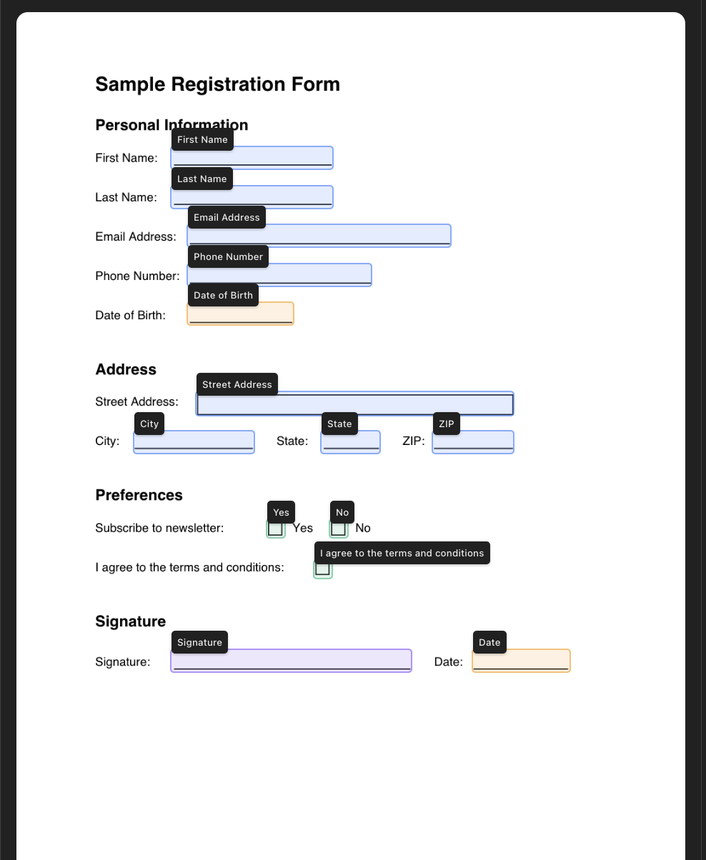
What looks like a field is not always a field.
PDF appearance and PDF structure are separate layers. A line beneath “Name” can be a widget annotation, a vector line, part of an image, or a mixture of objects. Only the first case is already an interactive form field.
| Document type | What is inside | Can code list fields? | Typical next step |
|---|---|---|---|
| AcroForm | Named fields, types, values, and widget rectangles | Yes | Read, map, fill, and render existing controls |
| Flat PDF | Text, vector lines, and page graphics without form controls | No usable controls | Identify expected inputs, create fields, then fill |
| Scanned PDF | One or more page images, sometimes with an OCR text layer | No usable controls | Interpret page images, review geometry, create fields, then fill |
| XFA or hybrid form | XML-based form data, sometimes alongside AcroForm controls | Viewer- and library-dependent | Inspect compatibility before choosing a processing path |
Ask the file what fields it contains.
A basic programmatic check is more reliable than clicking around the page. With pypdf, get_fields() reads the AcroForm field tree when one exists. An empty result does not mean the page has no form-like layout—it means the layout is not represented as usable AcroForm fields.
from pypdf import PdfReader

reader = PdfReader("document.pdf")
fields = reader.get_fields() or {}

if fields:
    for name, field in fields.items():
        print(name, field.get("/FT"))
else:
print("No AcroForm fields found")Choose the workflow from the document structure.
Inspect
Read the catalog and field tree. Check pages, rotation, and whether controls are actually present.
Use existing fields
If usable AcroForm controls exist, map values to those fields instead of reconstructing them visually.
Interpret missing structure
For flat or scanned pages, identify expected controls from the visible document and review the proposal.
Validate the result
Render and inspect the completed PDF, including field placement, appearance, and required values.
The field schema connects interpretation to deterministic work.
When usable controls are absent, PDFSight uses visual interpretation to propose structure. That proposal becomes field names, types, pages, and rectangles. From there, the application—not the model—owns construction, state, filling, preview, and temporary artifact delivery.
Page appearance
Text, lines, boxes, handwriting areas, and other visual clues.
Reviewable schema
Explicit types and coordinates make the proposed interpretation inspectable.
Constructed PDF controls
Deterministic code adds or fills the document structure and renders the result.
Useful distinctions before you automate.
Does selectable text mean a PDF is fillable?
No. Selectable text can come from native PDF text or OCR. Fillable controls are separate objects represented in an AcroForm field tree.
Can a scanned PDF become a real fillable PDF?
Yes, if fields are constructed at the correct page coordinates with suitable names and types. The page image remains the visual background while the new controls provide interaction.
Why not just place text over the page?
Annotation can solve a one-off editing task, but it does not necessarily create reusable, named form structure. A workflow that registers fields can keep collection and filling tied to an explicit schema.
Is automatic field detection always correct?
No. Scan quality and layout ambiguity matter. Treat detected structure as a proposal to review, then inspect the rendered result. PDFSight publishes current model evidence on /evals instead of making a universal accuracy claim.
Know what the file is asking of you.
Then choose the shortest honest path: fill existing fields, or construct the missing structure first.