
PDF form filling for MCP apps.
PDFSight exposes one authenticated guided-builder workflow at https://pdfsight.com/mcp. It turns document interpretation into an explicit schema, keeps workflow state tied to the user, and leaves PDF construction and filling to deterministic application code.
The model interprets. The application owns the document.
For pages without usable fields, visual interpretation proposes field names, types, pages, and rectangles. PDFSight owns the handoff from that schema into field construction, identity-bound state, guided collection, filling, preview, and expiring delivery.
Visual interpretation
Rendered pages are interpreted where labels and controls are visually ambiguous.
Field schema
Types and page-relative geometry create a reviewable boundary between model output and code.
PDF operations
pypdf-based application logic constructs fields, writes values, renders previews, and delivers artifacts.
Three tools, one guided builder.
The default production surface is deliberately small. Host-specific UI metadata can vary, but the document workflow stays in PDFSight.
pdfsight_open_guided_builder
Opens the interactive upload and guided-builder experience in a compatible MCP Apps host.
pdfsight_register_form
Registers a document and its reviewed field schema in identity-bound temporary workflow state.
pdfsight_fill_form
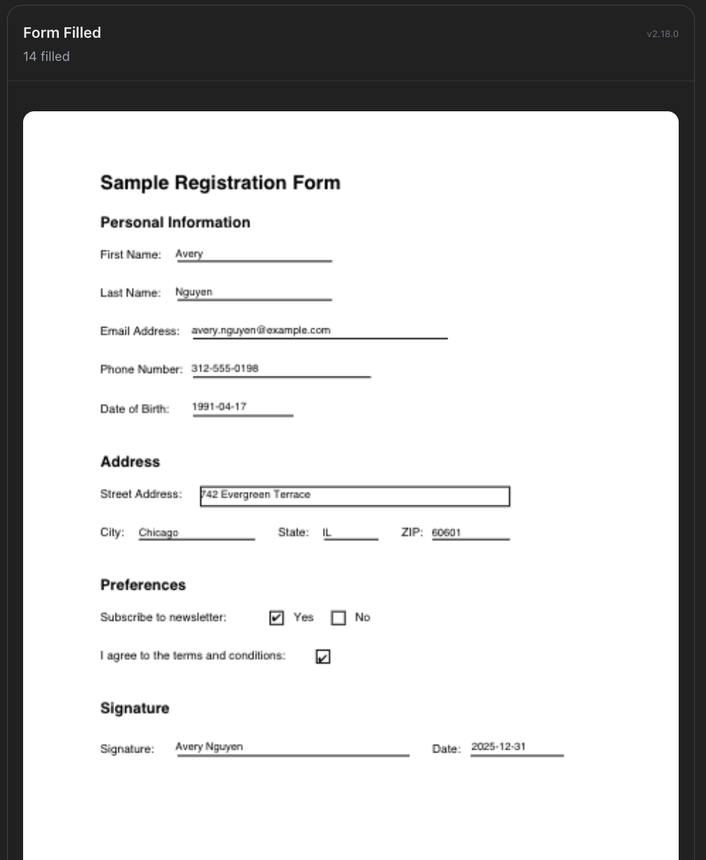
Applies collected values to the registered form and returns protected preview and delivery metadata.
Discover OAuth from the protected resource.
Production requires a PDFSight account and bearer token. A client begins at the resource, receives an HTTP 401 challenge, follows RFC 9728 protected-resource metadata, and completes authorization code OAuth with PKCE S256 and the exact MCP resource audience.
curl -i https://pdfsight.com/mcp

# HTTP/2 401
# WWW-Authenticate: Bearer resource_metadata=
#   "https://pdfsight.com/.well-known/oauth-protected-resource/mcp"

curl https://pdfsight.com/.well-known/oauth-protected-resource/mcp

# resource: https://pdfsight.com/mcp
# authorization server: https://pdfsight.comThe current discovery endpoints, scopes, redirect rules, revocation behavior, and support contact are documented at /docs/auth.
Keep every value tied to one registered document.
Authorize
The host connects to the exact MCP resource and obtains the read/write scopes the workflow needs.
Upload and review
The builder produces an explicit schema from existing fields or reviewed visual detection.
Collect values
Conversation and widget interactions remain linked to the subject and registered form state.
Fill and deliver
The server creates the filled artifact and exposes identity-checked, short-lived preview and download paths.
Temporary documents. Durable account and usage controls.
PDF bytes and workflow artifacts use short lifecycle windows. Accounts, OAuth grants, security records, and bounded operational usage metadata follow the separate retention purposes documented in the governing privacy notice and trust manifest.
| Data surface | Purpose | Current default | Boundary |
|---|---|---|---|
| Inactive form session state | Continue the current guided workflow | 30 minutes | Identity-bound |
| Registered guided forms | Maintain form/schema state across tool calls | Up to 6 hours | Identity-bound |
| Stored PDF artifacts | Preview and deliver source/filled files | 1 hour | Identity-checked access |
| Delivery links | Short-lived artifact retrieval | 5 minutes | No bearer in the URL |
Cleanup can be lazy after logical expiry. The privacy notice and machine-readable trust manifest are the governing current disclosure.
Test the boundary, not just the happy path.
- Verify HTTP 401 resource discovery before authorization and exact audience validation afterward.
- Exercise all three tools with valid and invalid inputs, including insufficient scopes.
- Confirm a second subject cannot read form state, previews, or filled artifacts from the first.
- Render detected and completed pages at enough resolution to validate field coordinates.
- Test token refresh, replay rejection, revocation, disconnect, and reconnect.
- Keep document bytes, field values, prompts, bearer tokens, and artifact credentials out of logs.
Use the document-structure guide to choose between existing-field filling and field construction. Use /evals for the current model accuracy, positioning, latency, and cost evidence.
Start at the protected resource.
Use the live production endpoint and let OAuth discovery establish the identity and permission boundary.